

Download MyZippa – Free, Lightweight ZIP Compression Tool for Windows
Looking for a fast, free, and secure way to compress multiple files or folders on your Windows PC? MyZippa is a lightweight, user-friendly file compression tool that simplifies the process with just one click. Designed specifically for Windows, this reliable software has been a go-to solution for users since 2004.
Despite its age, MyZippa continues to deliver solid performance, offering seamless integration with Windows Explorer and support for standard ZIP formats. Whether you're organizing work documents, backing up data, or preparing files for email, MyZippa makes file management effortless. With minimal system requirements and a clean interface, it’s ideal for users who value speed and simplicity over flashy features.
Available in English and trusted by thousands—especially in the Czech Republic—MyZippa remains a dependable choice for everyday compression tasks. Download MyZippa today and enjoy a no-frills, efficient way to manage your digital files.
Key Features of MyZippa – Why It Stands Out
MyZippa offers a refreshingly simple yet powerful set of features tailored for users who want quick and reliable file compression without unnecessary complexity. One of its standout features is one-click compression, allowing you to select multiple files or folders and compress them instantly into a single ZIP archive. This functionality is especially useful when preparing large sets of documents for email or cloud storage, eliminating the need for multiple manual steps.
Another major advantage is its deep integration with Windows Explorer. MyZippa adds a context menu option directly within the right-click menu, so you can compress or extract files without opening the application. This seamless integration saves time and enhances workflow efficiency, making it ideal for both beginners and experienced users. The software also supports standard ZIP format compatibility, ensuring that your compressed files can be opened on virtually any device or operating system.
Despite being developed in 2004 and last updated in 2006, MyZippa remains lightweight and fast. It uses minimal system resources, making it suitable for older PCs or systems with limited RAM. The interface is clean and intuitive, with no confusing menus or settings—just a straightforward experience focused on compression and extraction. Additionally, MyZippa supports batch processing, allowing users to compress multiple files at once without delays. For those who value privacy and security, the software operates offline and does not collect user data, making it a trustworthy choice for sensitive file handling.
- One-click compression for multiple files and folders
- Seamless Windows Explorer integration via context menu
- Supports standard ZIP format for universal compatibility
- Lightweight and fast, ideal for older systems
- Batch processing for efficient file management
- Offline operation with no data collection
How to Install and Use MyZippa on Windows
Getting started with MyZippa is quick and straightforward. First, visit a trusted software download site and search for MyZippa free download. Ensure you’re downloading from a verified source to avoid malware or bundled software. The installer is small in size, typically under 1MB, and installs in seconds. During setup, you’ll be prompted to choose your installation directory—though the default location is recommended for most users.
Once installed, MyZippa automatically integrates with Windows Explorer. To compress files, simply select one or more files or folders, right-click, and choose “Compress with MyZippa” from the context menu. The software will instantly create a ZIP file with the same name as the selected item, placed in the same folder. If you want to extract files, right-click the ZIP file and select “Extract with MyZippa” to unpack its contents.
For advanced users, MyZippa also supports command-line operations, allowing automation through scripts. This feature is useful for IT administrators or power users managing large-scale file organization. The tool doesn’t require administrative rights to run, making it accessible even on restricted workstations. Regular updates are not available due to the software’s age, but its stability and reliability mean it rarely crashes or causes issues. To keep your system secure, always scan downloaded files with antivirus software before installation.
For optimal performance, ensure your system meets the minimum requirements: Windows 95 or later. While newer versions of Windows may not officially support it, many users report successful operation on Windows 10 and even Windows 11 through compatibility mode. If you encounter issues, try running the program as an administrator or adjusting compatibility settings.
Compatibility and System Requirements
MyZippa is designed exclusively for Windows operating systems, with official support for Windows 95 and earlier versions. However, thanks to its lightweight architecture, it continues to function on modern Windows platforms, including Windows 10 and Windows 11. Users have reported successful installations and stable performance on these systems, especially when running the application in compatibility mode for Windows XP or Windows 7.
The software has minimal system requirements, making it perfect for older hardware or low-resource environments. It consumes very little RAM and CPU, ensuring it won’t slow down your computer during compression tasks. This makes MyZippa an excellent choice for users with outdated PCs who still need reliable file compression tools.
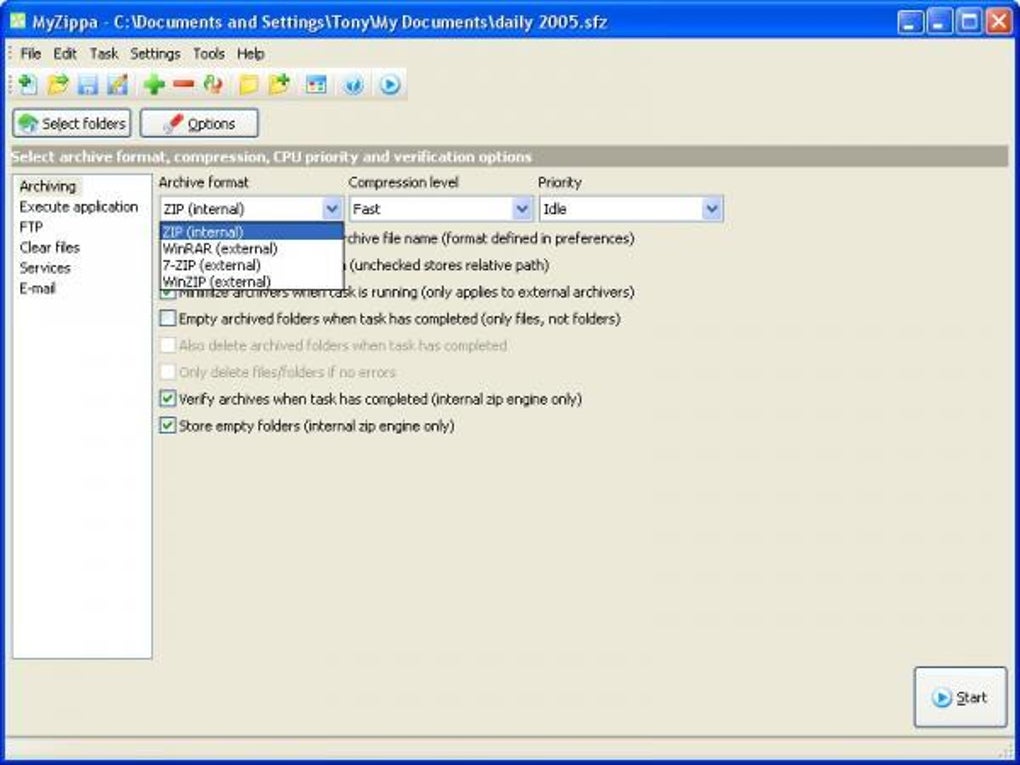
While MyZippa is only available in English and does not support other languages, its simple interface makes it easy to use regardless of language preference. It does not support other archive formats like RAR or 7Z, so users seeking advanced compression options should consider alternatives. However, for standard ZIP operations, MyZippa delivers consistent results.
For users looking for a cross-platform solution, MyZippa is not available for Mac, Android, or iOS. If you need file compression on multiple devices, consider tools like 7-Zip (free) or WinRAR for Windows, or native tools on Mac and mobile devices. Still, for Windows-only users who prioritize simplicity and speed, MyZippa remains a solid option.
Pros and Cons of Using MyZippa
Like any software, MyZippa has its strengths and limitations. Here’s a balanced look at what makes it valuable—and where it falls short.
Pros
- Extremely lightweight – Uses minimal system resources, ideal for older or low-end PCs.
- One-click compression – Simplifies the process of zipping files with no learning curve.
- Seamless Windows integration – Works directly from the right-click menu in Windows Explorer.
- Free and secure – No ads, no bundled software, and no data collection.
- Stable and reliable – Has been trusted since 2004 with consistent performance.
Cons
- Outdated development – Last updated in 2006; no official support for modern Windows features.
- No support for modern formats – Only works with ZIP; lacks RAR, 7Z, or other advanced formats.
- Only available for Windows – Not compatible with Mac, Android, or iOS.
- Language limited to English – No multilingual support.
- No update notifications – Users must manually check for newer versions.
Frequently Asked Questions (FAQ)
- Is MyZippa free to download and use?
Yes, MyZippa is completely free to download and use. There are no hidden costs, subscriptions, or trial periods. It’s a no-frills tool designed for basic ZIP compression tasks.
- Can I use MyZippa on Windows 10 or Windows 11?
While MyZippa was originally built for older Windows versions, many users successfully run it on Windows 10 and 11 by enabling compatibility mode. Try right-clicking the installer, selecting "Properties," then "Compatibility," and choose "Windows XP (Service Pack 3)" or "Windows 7."
- Does MyZippa support RAR or 7Z files?
No, MyZippa only supports standard ZIP format. If you need to work with RAR or 7Z archives, consider using 7-Zip or WinRAR, which offer broader format support.
- Is MyZippa safe to download?
Yes, when downloaded from trusted sources, MyZippa is safe and secure. Always scan the installer with antivirus software before running it. Avoid third-party sites with bundled malware or ads.
- Can I extract files with MyZippa?
Absolutely. MyZippa allows you to extract ZIP files by right-clicking them and selecting “Extract with MyZippa.” The tool handles both single and multiple file extractions efficiently.
Conclusion: Is MyZippa Worth Downloading in 2024?
Despite its age, MyZippa remains a compelling choice for users seeking a simple, fast, and free file compression tool on Windows. Its one-click functionality, seamless integration with Windows Explorer, and minimal system impact make it ideal for everyday tasks like organizing documents, backing up data, or sending files via email. While it lacks modern features like cloud integration or support for advanced archive formats, its core purpose—compressing and extracting ZIP files—is executed flawlessly.
If you’re using an older PC or prefer a no-nonsense tool that just works, MyZippa is a reliable and secure option. For users on Mac or mobile devices, alternative tools like 7-Zip or native archive utilities are better suited. But for Windows users who value speed, simplicity, and privacy, MyZippa continues to deliver.
Download MyZippa today and experience hassle-free file compression—no downloads, no bloat, just results.







